
AI Body-Scan and Progress-Photo Apps for Android in 2026
Android has good body-scan and progress-photo options, but they solve different problems. Here is how to choose between 3D measurements, AI photo analysis, and a repeatable progress timeline.
By Reset90 AI Editorial Team
Short answer: Android has good body-scan and progress-photo options, but they solve different problems. MeThreeSixty is a strong fit for tape-free 3D measurements, ZOZOFIT is built around shape and circumference tracking, browser-based AI tools are the lowest-friction way to get a photo estimate, and simple progress-photo apps are best when you mainly need a consistent timeline. If you want the check-in to change your training and nutrition plan, Reset90 is the more complete loop.
01Android body-scan and progress-photo apps at a glance
The first question is not “Which app has the most AI?” It is “What do I want to know after I take the photo?” A 3D scanner can answer how your measurements are changing. A photo analyzer can estimate composition from a visual snapshot. A progress-photo app can help you compare the same pose over time. Those outputs are related, but they are not interchangeable.
| App or format | Android access | Best for | Main trade-off |
|---|---|---|---|
| Reset90 AI | Android and iOS | Guided check-ins connected to a 90-day training and nutrition loop | It is a fitness planning system, not a clinical body-composition scanner |
| MeThreeSixty | Native Android app | Tape-free 3D body measurements and an avatar timeline | Scan conditions and repeatability still matter |
| ZOZOFIT | Native app on select Android devices | Detailed 3D shape and circumference tracking | Device compatibility and scan setup are more specific |
| Browser-based AI photo tools | Any modern Android browser | A quick estimate without installing an app | A single scan is not automatically a long-term history |
| Progress-photo apps | Several Android options | Keeping photos aligned and easy to compare | Most do not interpret the change or adjust your plan |
That last column is the one people usually skip. The scan itself is only the first half of the job. The useful question is what the result helps you decide next.
02Choose the signal before you choose the app
Body tracking on Android usually falls into three lanes.
3D measurement apps use your phone camera to estimate body shape, circumference, or a 3D avatar. They are useful when your main question is “Are my waist, hips, chest, or arms changing?” They are not magic tape measures: your pose, clothing, camera position, and device compatibility affect the result.
AI photo-analysis tools look at a photo and return estimates or scores. They are convenient and can add more context than a scale, but the output is still an estimate from an image. Lighting, angle, posture, and image quality can move the result.
Progress-photo trackers focus on repeatability. They help you take a front, side, or back photo in a similar frame, then review the timeline. This is often the most useful category for people who want visual proof without pretending a phone camera can replace a clinical measurement.
The best choice is the one that matches the question you are actually asking. If your question is “What are my measurements?”, start with a 3D scanner. If it is “Can I get a quick composition estimate?”, use a photo tool. If it is “Can I tell whether this plan is working?”, choose a timeline that you will still use six weeks from now.
03MeThreeSixty: best for tape-free 3D measurements
Platform: Android and iOS · Method: two phone-camera poses · Best for: people who want measurements and a visual avatar without a tape measure.
MeThreeSixty’s Google Play listing says the app builds a 3D body avatar from front and side images, with 14 or more trackable measurements. Its official site positions the product as a way to visualize a health and fitness journey over time, not just record scale weight.
That makes MeThreeSixty a practical Android starting point if your goal is to replace occasional manual measurements with a repeatable scan. It is also a good example of why “body scan” should not be treated as one universal category: the main output is a 3D representation and measurement trend, not a coach that rewrites your workout.
What it does well:
- It gives you more context than body weight alone.
- It makes circumference trends easier to review over time.
- It is designed around a small number of repeatable poses rather than a long manual measurement session.
What to watch: a smoothed avatar can make change easy to see, but it is still an estimate. Keep the camera distance, lighting, clothing, and pose as consistent as possible. If the app offers device or privacy settings, read them before your first scan; the Android store listing specifically describes on-device processing, but app policies and features can change.
Best fit: Android users who want measurement trends first and coaching second.
04ZOZOFIT: best for shape-focused tracking
Platform: Android and iOS on supported devices · Method: 3D body scanning with app-only or ZOZOSUIT workflows · Best for: people who want detailed shape and circumference comparisons.
ZOZOFIT’s Google Play listing describes 3D measurements across 16 key areas, side-by-side comparisons, progress visuals, and optional nutrition features. The company’s support documentation explains that users can scan in form-fitting clothing or use the ZOZOSUIT for a more structured setup.
ZOZOFIT is attractive if your definition of progress is “my shape is changing even when the scale is flat.” That is a real use case during recomposition, where muscle gain and fat loss can happen at the same time. A shape tracker can show a change that a single body-weight number hides.
The catch is that the app is more dependent on your device and scan protocol. ZOZOFIT’s supported-device page lists select Android models rather than promising universal compatibility. Check that list before building your whole tracking routine around it.
Best fit: Android users who want a detailed 3D shape record and are willing to follow a more specific scan setup.
05Browser-based AI photo tools: best for a quick estimate
One of the easiest ways to avoid the Android-versus-iOS problem is to use a browser. You do not need an app-store listing if the tool runs in a modern mobile browser.
GainFrame’s Android body-fat apps roundup makes this platform distinction unusually clear: the GainFrame app is iOS-only, while its free browser tool works on Android without an install or account. That is useful if you want one quick AI estimate before deciding whether you need a full tracking system.
Browser tools are good for low friction. They are not automatically good for longitudinal tracking. Before you upload a photo, check whether the product saves the result, how it handles privacy, and whether you can compare scans under the same conditions. A fast estimate that disappears after one session is a calculator, not a transformation timeline.
Also keep the category honest: an AI photo estimate is not a DEXA scan, a medical diagnosis, or proof that a single number is correct. Use it as a consistent signal, not as a verdict about your health.
06Reset90: best when the check-in needs to change the plan
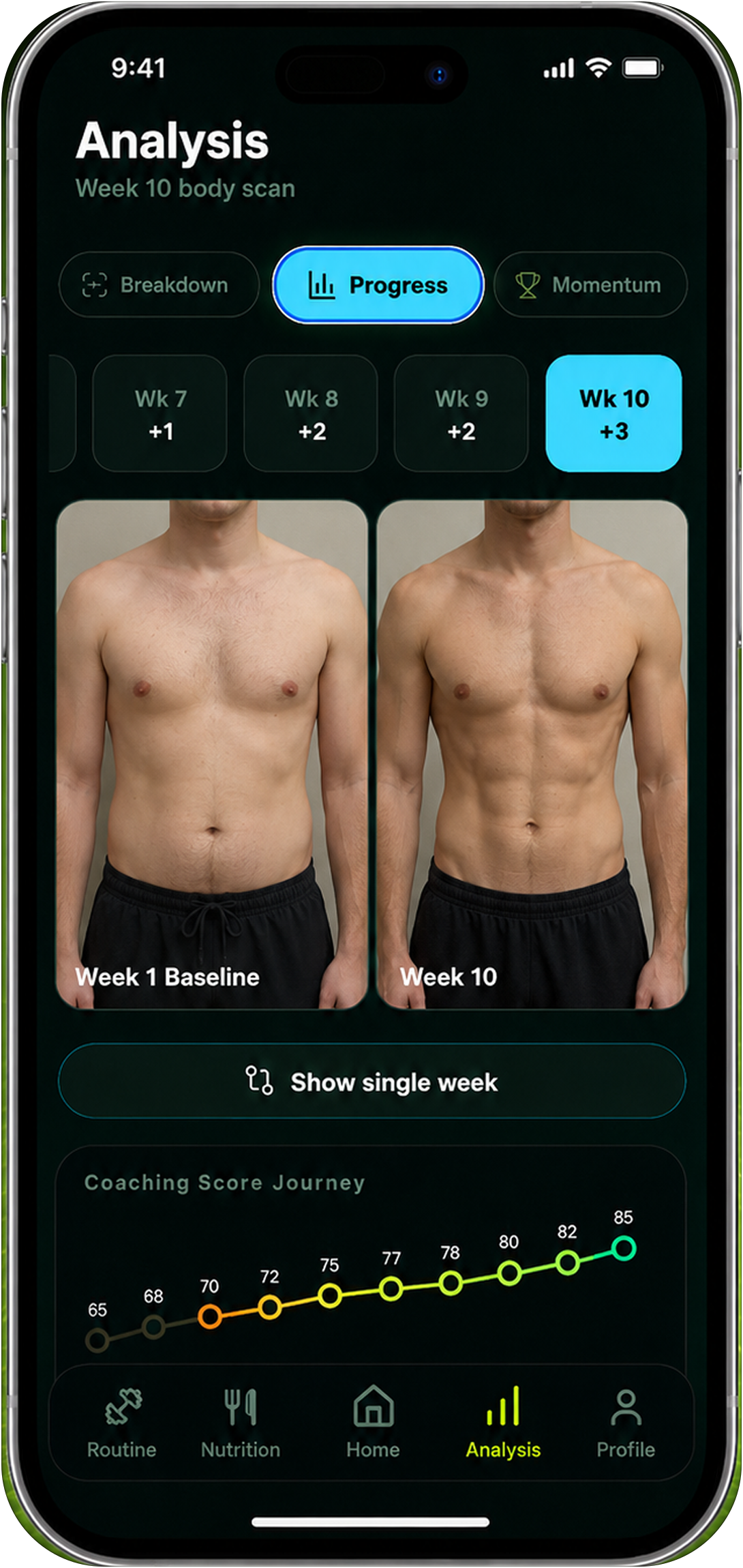
Platform: Android and iOS · Method: guided visual check-ins inside a 90-day fitness plan · Best for: people who want progress data connected to training, nutrition, and adherence.
Reset90 takes a different position in the category. It is not trying to be a clinical scanner or promise that one phone photo can reveal everything about body composition. Its guided Body Skin check-in is designed to make a visual comparison more repeatable, then keep that signal inside a larger plan.
The difference is the next action. A scan can tell you that your waist trend changed, your photo looks different, or your weekly check-in is moving in the wrong direction. Reset90 is built to connect that information to the next workout, nutrition target, or check-in decision instead of leaving the result as a screenshot.
If you are already using another Android scanner, Reset90 does not have to replace it. You can treat a dedicated 3D scan or measurement check as one data source and use Reset90 for the coaching loop around it. The useful stack is often “measurement tool plus decision system,” not “one app must do everything.”
Best fit: people who have taken progress photos or body scans before, but still trained and ate exactly the same way afterward.
07What a good Android progress-photo routine looks like
Regardless of which app you choose, the routine matters more than the novelty of the AI. Use the same room, camera height, distance, clothing style, and poses. Take the photo at roughly the same time of day. Avoid comparing a relaxed morning photo with a post-workout pump photo and calling the difference a trend.
Do not over-check. Daily photos magnify noise from hydration, food, lighting, and posture. Weekly or biweekly check-ins are usually easier to sustain and easier to interpret. If your app supports reminders or alignment guides, use them. The goal is not to produce the most flattering frame. It is to produce a comparable one.
Finally, record what changed around the photo: body weight trend, training consistency, sleep, and nutrition adherence. A photo without context is easy to misread. A photo with a consistent routine gives you a much better answer to “What happened?”
08Build a repeatable check-in on Android
A simple four-week test is enough to tell whether an app belongs in your routine.
- Set one check-in day. Pick a day and time you can repeat without negotiating with yourself.
- Lock the capture conditions. Use the same camera position, lighting, clothing, and poses.
- Save the output that matters. That might be a waist trend, a 3D measurement, a photo comparison, or a coaching decision.
- Write one sentence about the next action. Keep the plan stable unless the trend gives you a reason to change it.
After four weeks, ask whether the app helped you make a better decision or merely produced another number. If the answer is “another number,” you may need a different category of tool rather than another scanner.
09Which Android app should you choose?
Choose MeThreeSixty if your priority is a tape-free 3D measurement timeline. Choose ZOZOFIT if you want detailed shape tracking and your phone is supported. Choose a browser-based photo analyzer if you want a quick estimate with almost no setup. Choose a progress-photo app if visual consistency is the only missing piece.
Choose Reset90 if the real problem is not a lack of data but a lack of follow-through. Its job is to make the check-in useful inside a repeatable 90-day plan. You can read our broader AI body-scan comparison and body-transformation app guide for the non-Android-specific trade-offs.
If you are still unsure, start with the tool that makes you most likely to complete four consistent check-ins. A less sophisticated signal that you repeat is more useful than a perfect-looking scan you never repeat.
10Frequently asked questions
Is there a good body-scan app for Android?
Yes. MeThreeSixty offers native 3D scanning and measurement tracking, while ZOZOFIT is available on select Android devices for 3D shape and circumference tracking. Browser-based AI photo tools also work on Android without a native app.
Is GainFrame available on Android?
GainFrame’s current Android roundup says the native app is iOS-only, but its browser-based body-fat tool works on Android. Availability can change, so check the current product page before relying on a specific platform claim.
Are AI body scans accurate?
They are estimates, and the error depends on the method. 3D scans are sensitive to pose and device conditions. Photo analysis is sensitive to lighting, angle, clothing, and image quality. Use one method consistently and read the trend over several weeks rather than treating one reading as a clinical measurement.
Should I use a body scan or progress photos?
Use both if you have a clear reason. A scan can add measurements or structured estimates; photos can show visual changes that a number misses. The best routine is the one that keeps the capture conditions consistent and leads to a useful next action.
Can Reset90 replace a clinical body-composition test?
No. Reset90 is a fitness and nutrition planning tool, not a medical device or diagnostic service. If you need clinical assessment, talk with a qualified clinician. For everyday training, the value of a guided check-in is the repeatable trend and the decision it supports.
11The Android test that matters
Android users do not need one universally “best” body-scan app. They need a clear answer to three questions: what signal does the app produce, can the signal be repeated, and what will you do with it?
MeThreeSixty and ZOZOFIT are useful when measurement and shape are the job. Browser tools are useful when low friction is the job. Progress-photo apps are useful when visual consistency is the job. Reset90 is useful when the job is turning a weekly check-in into the next training and nutrition decision.
The technology is only half the choice. The app that earns a place on your Android phone is the one that still helps you make a better decision on check-in four.
The Reset90 system
Useful ideas for building a body you can keep.
Training notes, product updates, and practical ways to make your next 90 days count.
Start your next 90 days
Get your daily training, nutrition, and check-in priorities in one adaptive system.


Keep reading
Related articles
Ideal Body Measurements for Women
There is no single ideal body measurement set for women. Learn how averages, waist-to-height, body shape and repeatable tracking fit together without chasing a fixed beauty standard.
Read article
Bulk, Cut, or Recomp? A Practical Decision Guide
A practical way to choose a bulk, cut, recomp, or maintenance phase using your goal, training age, recovery, and repeatable progress signals.
Read article
How Often Should You Take Progress Photos?
How often should you take progress photos? Use this goal-based guide to choose weekly, biweekly, or monthly check-ins and make every comparison more consistent.
Read article