
Best AI Body-Scan and Progress-Photo Apps for Android in 2026
Compare Android body-scan and progress-photo options by scan method, compatibility, privacy, history, and the kind of progress decision each tool can support.
By Reset90 AI Editorial Team
Short answer: The best AI body-scan or progress-photo app for Android is the one that works on your phone, gives you a repeatable capture routine, and helps you compare change over time. A 3D scanner is useful for structured measurements, a progress-photo app is useful for visual timelines, and a browser tool is useful when you do not want another installation. Before choosing, check Android compatibility, input requirements, privacy, history, and whether the result helps you make a better training decision.
01What Android users should compare first
Searching for an AI body-scan app sounds like a simple shopping task. In practice, Android users are choosing between several different kinds of measurement product:
- 3D body-scan apps use a guided set of photos or a rotation to estimate measurements and create a body model.
- AI photo estimators use one or more progress photos to estimate visual or body-composition signals.
- Manual progress-photo apps focus on consistent capture, alignment, reminders, and before-and-after comparisons.
- Browser tools let you test a visual check-in without installing a native app, but they may offer less history or workflow.
- Full fitness systems connect a visual check-in to training, nutrition, and adherence instead of treating the scan as the entire product.
These products are not interchangeable. If you want a measurement for a clothing decision, a 3D scanner may be the most relevant. If you want to see whether eight weeks of training changed your shape, a consistent photo timeline may be more useful. If you want to know what to do next, the measurement needs to sit inside a larger plan.
02Our Android-first decision guide
| What you need | Best format to start with | What to check |
|---|---|---|
| Structured body measurements | 3D scan app | Supported Android models, clothing and pose rules, measurement history |
| A visual before-and-after timeline | Progress-photo app | Alignment guides, reminders, fixed angles, export and privacy controls |
| A quick one-time estimate | Browser-based AI photo tool | Whether the result is saved, how repeatable the input is, and what the estimate means |
| Training and nutrition decisions | Integrated fitness system | Whether scan data connects to workouts, meals, adherence, and the next review |
“AI” is not a category by itself. Two apps can both use the phrase while asking for completely different inputs and producing completely different outputs. Start with the decision you want to make, then choose the smallest measurement system that can answer it consistently.
03Best for structured 3D measurements: a dedicated body-scan app
A dedicated 3D body-scan app is the clearest choice when your main job is tracking circumferences, shape, or a body model over time. Apps in this category commonly guide you through front, side, and sometimes rotation images, then estimate a set of body measurements.
MeThreeSixty and ZOZOFIT are examples of the 3D-scan category that Android users may encounter. Their exact supported devices, scan requirements, pricing, and features can change, so availability should be checked at the time you install them. A listing in the Play Store does not always mean every Android phone is compatible with every scan mode.
Choose this category when you want:
- a repeatable set of body measurements rather than a single score;
- a visual model or avatar that makes change easier to see;
- side-by-side comparisons across several check-ins;
- the discipline of following a guided capture process.
Be careful with highly precise body-fat numbers. A 3D model can be useful for tracking a direction while the absolute estimate remains sensitive to pose, clothing, lighting, camera angle, and the model’s assumptions. The more specific the claim, the more validation you should expect.
04Best for a simple visual timeline: a progress-photo app
If your real question is “Can I see a change from month one to month three?”, a progress-photo app may be a better fit than a scanner. The core feature is not a number. It is a repeatable way to capture, align, label, and compare images.
Manual progress-photo apps can be surprisingly effective because they reduce the biggest source of noise: taking a different photo every time. A good workflow keeps your camera height, distance, lighting, pose, clothing, and timing as consistent as possible. It also keeps the images out of an unstructured camera roll where they are easy to forget.
Look for:
- front, side, and back-angle templates;
- ghost or alignment overlays;
- weekly or biweekly reminders;
- side-by-side comparison and timeline views;
- clear privacy and deletion controls;
- an option to keep the process useful without public sharing.
A photo timeline is not a clinical measurement. It is a visual record. That is often exactly what you need when the scale is noisy, muscle gain is gradual, or the change is easier to see across weeks than from one day to the next.
05Best when you do not want another installation: a browser tool
Some Android users do not want to download an app just to test a single body-progress idea. A browser tool can reduce that friction: open the page, upload or capture a photo, and receive an estimate or visual result.
The trade-off is continuity. A browser tool may be excellent for a one-time check-in but less useful for reminders, a long-term timeline, or connecting the result to workouts and meals. Before you treat a one-time estimate as part of a routine, ask whether you can repeat the same input and whether the result can be compared later.
Browser-based tools are best used as a preview or a low-friction starting point. If the output motivates you to build a consistent check-in habit, then choose a system that can preserve that history rather than asking you to start from zero each time.
06Best for connecting a scan to a 90-day plan: an integrated fitness system
A body scan is most useful when it changes a reasonable next action. If a progress check-in says nothing about your training, nutrition, adherence, or recovery, you may end up collecting measurements without making decisions.
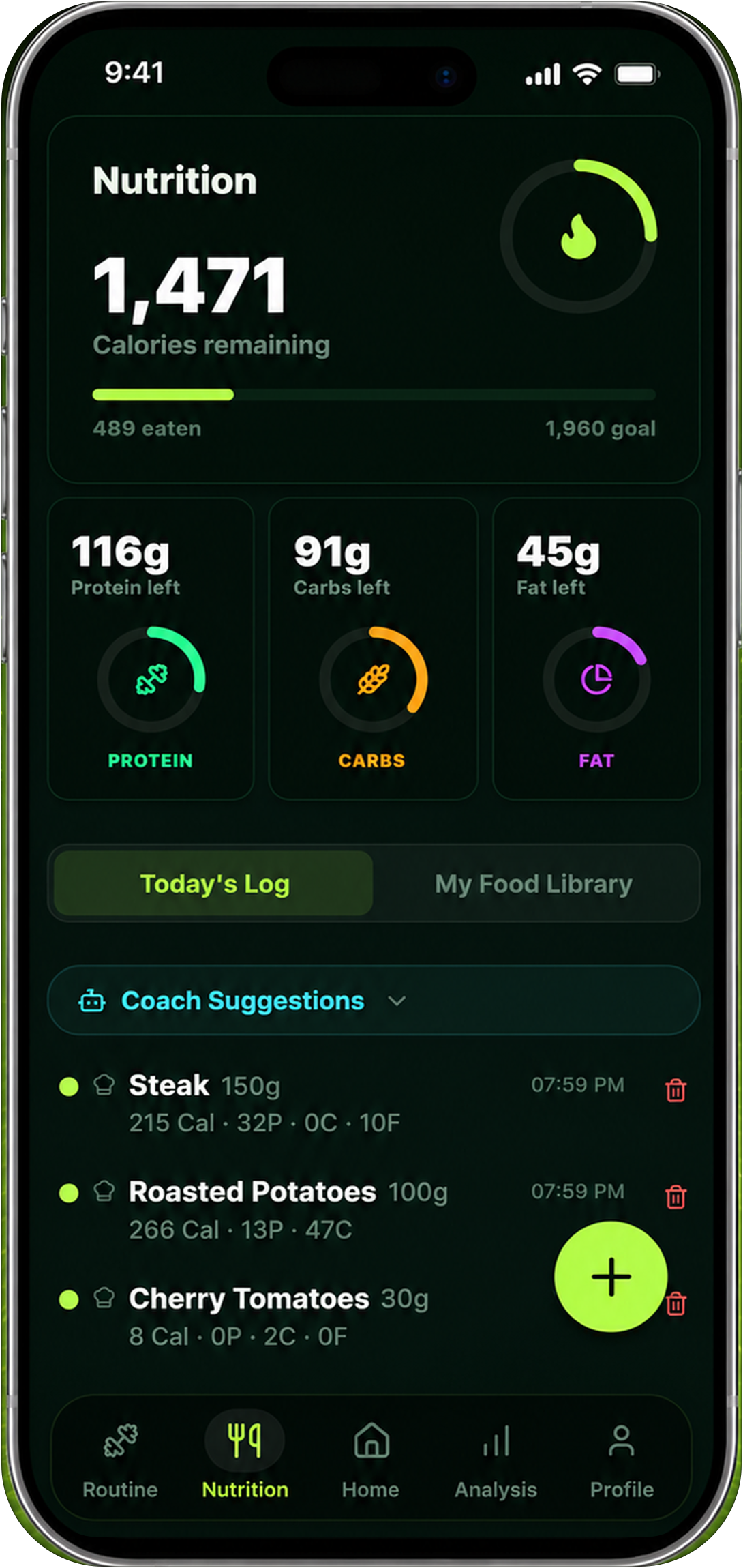
Reset90 is built for the integrated version of this workflow. Its visual check-in can sit alongside workout execution, nutrition targets, and the longer 90-day arc. That does not make the check-in a medical measurement. It makes the signal easier to interpret in context.
Choose an integrated fitness system when you want to answer questions such as:
- Should I keep the current plan steady for another week?
- Is a stalled visual change happening alongside inconsistent training or nutrition?
- Do my photos, weight trend, strength, and adherence point in the same direction?
- What is the smallest adjustment that makes sense next?
The advantage is not that the app can predict your body perfectly. The advantage is that it can help you avoid reacting to one isolated number.
07Check Android compatibility before you commit
Android is not one device. A scan that works on a recent flagship phone may not work the same way on an older phone, a tablet, or a device with a different camera layout. Compatibility can also vary by scan mode inside the same app.
Before creating an account or paying for a plan, confirm:
- Operating-system requirement. Check the minimum Android version and whether the app still supports your current device.
- Camera and sensor needs. Some workflows need only a camera; others depend on depth, motion, or a particular camera position.
- Capture space. A guided scan may require enough room to stand back from the phone and turn or raise your arms.
- Input rules. Clothing, background, lighting, and phone orientation can affect whether the scan succeeds.
- History portability. Find out whether your check-ins can be exported or viewed if you change phones.
- Privacy controls. Read what happens to uploaded photos, generated models, and account data.
Do not use “available on Android” as a complete compatibility check. Treat it as the beginning of the check.
08Privacy matters more for body images
A body-progress photo is sensitive personal data even when it is used only for fitness. The app may process the image on the phone, upload it to a server, create a derived body model, or retain it for future comparisons. Those choices affect your privacy and the amount of control you have later.
Before uploading a photo, look for plain answers to these questions:
- Is the original image stored, and for how long?
- Is the image used to improve the model or train a system?
- Can you delete both the original and the generated result?
- Can you use the app without public sharing or social discovery?
- Does the app explain whether processing happens on-device or in the cloud?
Privacy is not a minor feature comparison. A tool that you trust enough to use consistently is often more valuable than a tool with a longer list of metrics that you stop using after one uncomfortable upload.
09Consistency beats a more impressive scan
The most advanced scan is not automatically the best progress system. If it takes too long, requires a perfect room, or makes you uncertain about how to repeat it, the data will become irregular.
A simpler system can win by being repeatable. Use the same day, approximate time, camera height, distance, background, pose, and clothing. Record unusual context such as a hard workout, poor sleep, a large meal, or a major change in hydration. Review several check-ins together instead of changing your plan after one result.
Consistency also protects your interpretation. If the result changes, you have a better chance of knowing whether the change came from your body, the measurement conditions, or the app.
10How to compare the result with the rest of your progress
Do not ask a body-scan app to answer a question it cannot answer alone. Use multiple signals:
| Signal | Useful question | Common limitation |
|---|---|---|
| Progress photos | Does my shape look different under comparable conditions? | Lighting, pose, clothing, and camera distance |
| Body measurements | Are specific circumferences changing? | Placement, tape tension, posture, and daily fluctuation |
| Scale trend | What is the multi-day weight direction? | Hydration, food, sodium, digestion, and timing |
| Strength and performance | Am I adapting to the training plan? | Exercise selection, fatigue, technique, and program changes |
| Adherence | Did I actually follow the inputs that should drive change? | Incomplete logging and overly strict tracking |
When several signals agree, your confidence in the direction improves. When they disagree, wait, check the measurement conditions, and avoid making a dramatic adjustment from one noisy data point.
11What not to trust in an app comparison
Be cautious with comparisons that rank apps only by the number of metrics they display. More metrics do not automatically mean better measurement. A long dashboard can hide weak inputs, unclear definitions, or a lack of history.
Also be skeptical of exact body-fat promises that do not explain the model, the reference method, the sample, or the capture protocol. “AI-powered” describes a technique, not a guarantee. A product can be useful for tracking direction without producing a clinically accurate absolute number.
Finally, do not assume the top Android result is the best fit for your goal. A 3D measurement app, a progress-photo timeline, and a full fitness planner may all be excellent products for different jobs.
12Reset90's Android workflow
Reset90 connects the visual check-in to the parts of the plan that you can actually change: workouts, nutrition, consistency, and the next review. The goal is not to turn a body image into a verdict. The goal is to make progress easier to see and the next decision easier to explain.
You can start with the Reset90 Android page, review the broader AI body-scan app guide, or use the body-fat visualizer as a low-friction estimate. For a deeper explanation of measurement limits, read how accurate AI body-scan apps really are.
Reset90 is a fitness and nutrition planning product, not a medical device or diagnostic service. Treat every visual estimate as one signal in a broader progress review.
13Frequently asked questions
What is the best AI body-scan app for Android?
There is no universal winner. Choose a 3D scan app for structured measurements, a progress-photo app for visual comparisons, a browser tool for a quick check-in, or an integrated fitness system when you want the signal connected to training and nutrition.
Are 3D body scans better than progress photos?
They answer different questions. 3D scans can provide structured measurements and a body model. Progress photos can make gradual visual change easier to compare. The better option is the one you can repeat and interpret.
Can I use a body-scan app on any Android phone?
No. Compatibility can depend on Android version, camera hardware, device model, scan mode, and available space. Check the app’s current device requirements before relying on it.
Are AI body scans private?
Privacy depends on the product. Check whether images are processed on-device or uploaded, how long they are retained, whether derived models are stored, and whether you can delete your data.
How often should I take progress photos or body scans?
Weekly or biweekly is a practical starting point. Keep conditions consistent and review several check-ins together instead of reacting to one reading.
14The practical answer
For Android users, the best body-scan or progress-photo app is not the one with the most impressive promise. It is the one that works on your phone, respects your privacy, gives you a repeatable input, and helps you understand what to do next.
Start with your job: measurements, visual timeline, one-time estimate, or integrated plan. Then check compatibility, capture friction, history, privacy, and the limits of the output. A modest signal you can trust every week will beat a precise-looking number you cannot reproduce.
The Reset90 system
Useful ideas for building a body you can keep.
Training notes, product updates, and practical ways to make your next 90 days count.
Start your next 90 days
Get your daily training, nutrition, and check-in priorities in one adaptive system.


Keep reading
Related articles
Ideal Body Measurements for Women
There is no single ideal body measurement set for women. Learn how averages, waist-to-height, body shape and repeatable tracking fit together without chasing a fixed beauty standard.
Read article
Bulk, Cut, or Recomp? A Practical Decision Guide
A practical way to choose a bulk, cut, recomp, or maintenance phase using your goal, training age, recovery, and repeatable progress signals.
Read article
How Often Should You Take Progress Photos?
How often should you take progress photos? Use this goal-based guide to choose weekly, biweekly, or monthly check-ins and make every comparison more consistent.
Read article